






Showing posts with label Mystical Scraps. Show all posts
Showing posts with label Mystical Scraps. Show all posts
September 28, 2015
PTU Kit: Devils Playground

100 Elements
13 Papers
Smiley Creations
Scrapping Your Memories
Mystical Scraps
May 13, 2015
PTU Kit ~ Summer Days

May 10, 2015
PTU Tutorial ~ Sexy Woman

Written: 5/10/15
I used PSP XI to write this tutorial
You must have basic knowledge of PSP
Scrap Kit: Beautiful Blush by Rissa's Designs
Tube: Sexy Woman by Tunchy Art
Font: Prester John
Plugins: None
New canvas 600*600
Open 77 - copy/paste - resize 66% - position to your liking - use your magic wand to highlight the inside of your frame - expand by 15 - new layer - open paper 8 - copy/paste into selection - select none
Paste another layer of your tube - resize 60% - position to your liking under your frame - use your magic wand to highlight the inside of your frame - expand by 15 - invert - select your tube layer - delete - select none - set opacity to around 60
Open paper6 - resize 600x600 - open mask of choice - new mask layer - apply - merge group - copy/paste - position to your liking
Open 66 - copy/paste - resize 35% - position to your liking
Open 70 - copy/paste - resize 33% - position to your liking
Open 65 - copy/paste - resize 35% - position to your liking
Open 69 - copy/paste - resize 50% - position to your liking
Add copyright, license and name
Save as png
April 29, 2015
PTU Tutorial ~ Man Eater

Written: 4/29/15
I used PSP XI to write this tutorial
You must have basic knowledge of PSP
Scrap Kit: Crying Rose by Rissa's Designs
Tube: Man Eater by Gary Rudisill
Font: BallpointScratch
Plugins: None
New canvas 600*600
Open 56 - copy/paste - resize 58% - use your magic wand to highlight the inside of your frame - expand by 12 - new layer - open paper 3 - copy/paste into selection - select none
Open 44 - copy/paste - resize 75% - position to your liking - drop shadow
Open tube - copy/paste - do not resize - position to your liking
Open 58 - copy/paste - resize 65% - position to your liking
Open 59 - copy/paste - resize 60% - position to your liking
Open 72 - copy/paste - resize 70% - position to your liking
Open 4 - copy/paste - resize 25% - position to your liking
Duplicate - Mirror - position to your liking
Open 25 - copy/paste - resize 30% - position to your liking
Add copyright, license and name
Save as png
April 23, 2015
PTU Tutorial ~ Rock


Written: 4/23/15
I used PSP XI to write this tutorial
You must have basic knowledge of PSP
Scrap Kit: Emo Cute by Kizzed by Kelz
Tube: Tattoo Freak by Justic Howard
Font: Postcards from Mars
Plugins: None
New canvas 600*600
Open 29 - copy/paste - resize 65% - position to your liking - use your magic wand to highlight the inside of your frame - expand by 12 - new layer - open paper 6 - copy/paste into selection - select none
Open tube - copy/paste - resize 65% - position to your liking - drop shadow
Open 27 - copy/paste - resize 70% - position to your liking
Open 36 - copy/paste - do not resize - position to your liking
Open 17 - copy/paste - resize 45% - position to your liking
Open 88 - copy/paste - resize 35% - position to your liking
Open 90 - copy/paste - resize 30% - position to your liking
Open 75 - copy/paste - resize 40% - position to your liking
Add copyright, license and name
Save as png
February 13, 2013
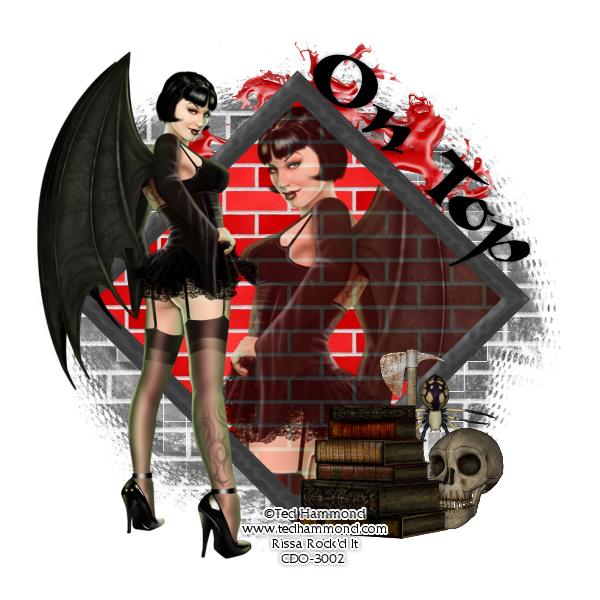
Bite Me Tag & Snags



February 6, 2013
PTU Tutorial~Sweet Melody

This tutorial is my
creation and any resemblance to any other is coincidence and not intentional
Written: 2/6/13
Written: 2/6/13
Font~Fiolex Girls
Items usef from kit:
MS_Frame3
MS_Paper3
MS_Paper1
MS_Element38
MS_Element9
MS_Element33
MS_Element3
MS_Paper3
MS_Paper1
MS_Element38
MS_Element9
MS_Element33
MS_Element3
New canvas 600*600
MS_Frame3, Paste and Resize 80% and position to your liking
MS_Paper3, Paste under frame and delete excess
Add tube(s)
MS_Paper1, Resize
600*600 and apply mask of choice, Merge then Paste
MS_Element38, Paste
and Resize 95% and position to your liking
MS_Element9, Paste and Resize 20% and rotate then position to your liking
MS_Element9, Paste and Resize 20% and rotate then position to your liking

MS_Element33, Paste,
do not resize and position to your liking then duplicate and mirror
MS_Element3, Paste and Resize 50% and position to your liking then duplicate and mirror
MS_Element3, Paste and Resize 50% and position to your liking then duplicate and mirror
Add copyright and
license
Add name
Add name
Add dropshadow to
tube
Save as png

January 29, 2013
PTU Tutorial~Pimptress

This tutorial is my
creation and any resemblance to any other is coincidence and not intentional
Written: 1/29/13
Written: 1/29/13
Scrap kit: It's A Pimptress Thing by Scottish Butterfly Creations
Artwork by Jamie Kidd
Font~Casua
Items used from kit~
Frame2
Paper2
Paper12
Car
Clock
Bodice2
Dice
Frame2
Paper2
Paper12
Car
Clock
Bodice2
Dice
New canvas 600*600
Frame2, Paste and resize 75% and position to your liking
Paper2, Paste under frame and delete excess
Add tube(s)
Duplicate tube and
add blur to top layer

Change layer properties to Hard Light
Add drop shadow
Paper12, Resize
600*600 and apply mask of choice, Merge and Paste
Car, Paste and Resize
55% and position to your liking
Clock, Paste and Resize 40% and position to your liking
Bodice2, Paste and resize 30% and position to your liking
Dice, Paste and resize 30% and position to your liking
Add drop shadow to all and tube
Add copyright and license
Add name
Clock, Paste and Resize 40% and position to your liking
Bodice2, Paste and resize 30% and position to your liking
Dice, Paste and resize 30% and position to your liking
Add drop shadow to all and tube
Add copyright and license
Add name
Save as png
January 13, 2013
PTU Tutorial~EMOtional Disaster

This tutorial is my
creation and any resemblance to any other is coincidence and not intentional
Written: 1/13/13
Written: 1/13/13
Scrap kit: TLP Designz kit So Emo-tional
Artwork by Alehandra Vanhek
Font~ John's 1000 Hurts
Items used from kit~
tag09
bandaid04
tag10
bandaid02
pp08
button02
headphones
ipod
star01
tag01
tag09
bandaid04
tag10
bandaid02
pp08
button02
headphones
ipod
star01
tag01
New canvas 600*600
tag09, Paste and Resize 60%, position to your liking
bandaid04, Paste and Resize 55%, position to your liking
tag10, Paste and Resize 65%, position to your liking
bandaid02, Paste and do not resize, position to your liking
Add tube(s)
Pp08, Resize 600*600
and apply mask of choice then paste
Button02, Paste and
position to your liking
headphones, Paste and Resize 60%, position to your liking
ipod, Paste and resize 35%, position to your liking
star01, Paste and resize 50%, position to your liking
tag01, Paste and resize 65%, position to your liking
Add dropshadow to:
headphones, Paste and Resize 60%, position to your liking
ipod, Paste and resize 35%, position to your liking
star01, Paste and resize 50%, position to your liking
tag01, Paste and resize 65%, position to your liking
Add dropshadow to:
Tag01
star01
ipod
headphones
button02
Tube
star01
ipod
headphones
button02
Tube
Add copyright and
license
Add name
Add name
Save as png
December 14, 2012
PTU Tutorial~Silent

This tutorial is 100%
my creation, any resemblance to any other is coincidence and not intentional
Written: 12/14/12
Written: 12/14/12
Scrap kit~Silver andGold by BLT Dezignz
Artwork by Rebecca Sinz
Font: Hancock
Items used from kit:
Frame5
PP1
PP9
Branch1
Cupcake1
Border1
Icicles
Snowflake2
Frame5
PP1
PP9
Branch1
Cupcake1
Border1
Icicles
Snowflake2
Open new canvas
600*600
Frame5, Paste and Resize 45%. Position to your liking
Frame5, Paste and Resize 45%. Position to your liking
PP1, Paste under
frame and delete excess around edges
Add tube(s)
PP9, Resize 600*600,
Apply mask of choice and merge group then paste
Branch1, Paste and
Resize 30%. Position to your liking
Cupcake1, Paste and Resize 20%. Position to your liking
Border1, Paste and Resize 50%. Position to your liking
Icicles, Paste and Resize 43%. Position to your liking
Snowflake2, Paste and Resize 30%. Position to your liking
Add drop shadow to all and tube
Cupcake1, Paste and Resize 20%. Position to your liking
Border1, Paste and Resize 50%. Position to your liking
Icicles, Paste and Resize 43%. Position to your liking
Snowflake2, Paste and Resize 30%. Position to your liking
Add drop shadow to all and tube
Add copyright and
License
Add name/wordart
Add name/wordart
Save as png
December 6, 2012
PTU Tutorial~Hot Christmas


This tutorial is 100%
my creation, any resemblance to any other is coincidence and not intentional
Written: 12/6/12
Written: 12/6/12
Scrap kit~No Peekin' by Jens Sweet Temptations
Artwork by Arthur Crowe
Font: Tribal Script
Items used from the
kit:
Paper5
Bow1
Candycanes
Card
Tree
Sign
Paper5
Bow1
Candycanes
Card
Tree
Sign
Open a new canvas
600*250
Flood fill with Paper5
New raster layer
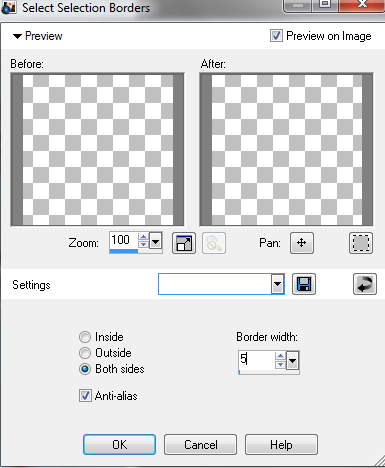
Select
All>Modify>Select Selection borders

Flood fill with color
#8dbf2a
Add noise
Add noise

Add tube(s)
Bow1, Paste and
Resize 40%. Position to your liking
Candycanes, Paste and Resize 40%. Position to your liking.
Card, Paste and Resize 35%. Position to your liking.
Tree, Paste and Resize 35%. Position to your liking.
Sign, Paste and Resize 45%. Position to your liking
Candycanes, Paste and Resize 40%. Position to your liking.
Card, Paste and Resize 35%. Position to your liking.
Tree, Paste and Resize 35%. Position to your liking.
Sign, Paste and Resize 45%. Position to your liking
Add drop shadow to
all and tube
Add copyright and
license
Add name/wordart
Add name/wordart
Save as png
Avi:
New canvas 150*200
Flood fill with Paper5
Repeat previous steps for border
Add noise
Flood fill with Paper5
Repeat previous steps for border
Add noise
Add tube(s)
Add copyright and
license
Add initial text
Add initial text
Save as png
November 26, 2012
PTU Tutorial~Retro


This tutorial is 100%
my creation, any resemblance to any other is coincidence and not intentional
Written: 11/26/12
Written: 11/26/12
You must have basic
knowledge of PSP
I used PSP 11 for this tutorial but it should work in all versions
I used PSP 11 for this tutorial but it should work in all versions
Scrap kit~Retrosonic
by Creative Crazy Scraps
Artwork by Alex Prihodko
Font: Reticulum 3
Items used from kit:
Paper9
E11
E13
E35
E9
Paper9
E11
E13
E35
E9
Open a new canvas
600*250
Paper9>Make this
your pattern
Flood fill your canvas
Flood fill your canvas
New raster layer
Select all
Modify>Select Selection borders
Modify>Select Selection borders

Flood fill with
#faaf83
Adjust>Add/remove noise>Add noise

Add tube
E11>Paste>Do not resize>Position to your liking
E13>Paste>Do not resize>Position to your liking
E35>Paste>Resize 40%>Rotate>Position to your liking
E11>Paste>Do not resize>Position to your liking
E13>Paste>Do not resize>Position to your liking
E35>Paste>Resize 40%>Rotate>Position to your liking

E9>Paste>Resize
40%>Rotate>Position to your liking

Add drop shadow to
all
Add copyright and license
Add name/wordart
Add copyright and license
Add name/wordart
Save as png
For the avi:
Open new canvas
150*150
Flood fill with previous pattern
Flood fill with previous pattern
New raster layer
Select all
Modify>Select Selection Borders
Modify>Select Selection Borders

Flood fill with
previous color
Select none
Select none
Add previous noise settings
Add tube
Add desired elements
Add copyright and
license
Add name/wordart
Add name/wordart
Save as png
November 23, 2012
PTU Tutorial~Rawk It

This tutorial is 100%
my creation, any resemblance to any other is coincidence and not intentional
Written: 11/21/12
Written: 11/21/12
You must have basic
knowledge of PSP
Scrap kit~Rawk On By
Freeks Creations
Artwork by Verymany
Font: Rock
Items used from kit:
E39
P6
P13
E4
E7
E1
E6
E5
E15
E23
E3
E39
P6
P13
E4
E7
E1
E6
E5
E15
E23
E3
Open a new canvas
600*600
E39>Paste>Resize
70%>Positon to your liking
P6>Paste>Place under frame>Delete excess around edges
P6>Paste>Place under frame>Delete excess around edges
Add Tube
P13>Resize
600*600>Apply mask of choice
Merge group>Paste
Merge group>Paste
E4>Paste>Resize
40%>Position to your liking
E7>Paste>Resize 60%>Position to your liking
E1>Paste>Resize 30%>Rotate>Positon to your liking
E7>Paste>Resize 60%>Position to your liking
E1>Paste>Resize 30%>Rotate>Positon to your liking

E6>Paste>Resize
25%>Position to your liking
E5>Paste>Resize 23%>Rotate>Resize to your liking
E5>Paste>Resize 23%>Rotate>Resize to your liking

E15>Paste>Resize
60%>Position to your liking
E23>Paste>Resize 45%>Rotate>Position to your liking
E23>Paste>Resize 45%>Rotate>Position to your liking

E3>Paste>Resize
60%>Position to your liking
Add drop shadow to
all
Add copyright and
license
Add name/wordart
Save as png
Subscribe to:
Posts
(Atom)
I CT For




CU4CU License


