


July 18, 2014
PTU Tutorial ~ Zombie Freya


Written: 7/18/14
I used PSP XI to write this tutorial
You must have basic knowledge of PSP
Scrap Kit: Freya's Heart by Wicked Princess Scraps
Tube by Freya Langford - Sidebottom
Font: Ghost Everywhere
Plugins: None
Items used from kit:
New canvas 600*600
Open GATE - copy/paste - resize 50% - position to your liking
Open GRAVE - copy/paste - resize 50% - position to your liking
Open your full size tube - copy/paste - resize and position to your liking
Open CUPCAKE - copy/paste - resize 25% - position to your liking
Open BEAR - copy/paste - resize 30% - position to your liking
Open CAN - copy/paste - resize 30% - position to your liking
Open BARBWIRE - copy/paste - resize 45% - position to your liking
Open BRAINCUPCAKE - copy/paste - resize 25% - position to your liking
PTU Tutorial ~ Tropical Babe

Written: 7/18/14
I used PSP XI to write this tutorial
You must have basic knowledge of PSP
Scrap Kit: Tropical Oasis by Irish Princess Designs
Tube: Laura by Verymany Tubes
Font: The Hit
Plugins: None
Items used from kit:
New canvas 600*600
Open element84 - copy/paste - resize 80% - position to your liking
Open paper10 - copy/paste under frame - delete excess around frame
Open paper1 - resize 600*600 - open mask of choice - apply mask - merge group - copy/paste - position to your liking
Open full size tube - copy/paste - resize 40% - place under frame - duplicate - move duplicated layer above frame - erase bottom part of top layer tube
Open element24 - copy/paste - resize 40% - position to your liking
Open element37 - copy/paste - resize 35% - position to your liking
Open element41 - copy/paste - resize 43% - position to your liking
Open element74 - copy/paste - resize 35% - position to your liking
Open element46 - copy/paste - resize 30% - position to your liking
Open element1 - copy/paste - resize 30% - position to your liking
Open element58 - copy/paste - resize 45% - position to your liking
July 17, 2014
PTU Tutorial ~ Fairy Nights

Written: 7/17/14
I used PSP XI to write this tutorial
You must have basic knowledge of PSP
Scrap Kit: Fairy Nights 2 by Tiny Turtle Designs
Tube: Flora Fairy by Arthur Crowe
Font: Take A Pebble
Plugins: None
Items used from kit:
New canvas 600*600
Open element 67 - copy/paste - resize 75% - rotate 45 degrees right - position to your liking - use your magic wand to select the inside of your frame - expand by 12 - new layer - open paper 24 - copy/paste into selection - select none
Open close up tube - copy/paste under frame - use magic wand and select the inside of your frame - expand by 12 - invert - delete excess of your tube - select none
Duplicate - Gaussian Blur - Radius 15 - Layer Property: Burn - Opacity around 61
Open full size tube - copy/paste - resize 62% - position to your liking - drop shadow
Open Paper 5 - resize 600*600 - open mask of choice - new mask layer - apply mask of choice to paper 5 - merge group - copy/paste - position to your liking
Open element99 - copy/paste - resize 65% - position to your liking
Open element2 - copy/paste - resize 30% - position to your liking
Open element 21 - copy/paste - resize 35% - position to your liking
Open element15 - copy/paste - resize 35% - position to your liking
Open element55 - copy/paste - resize 32% - position to your liking
Open element 129 - copy/paste - resize 46% - position to your liking
Open element61 - copy/paste - resize 35% - position to your liking
Open element73 - copy/paste - do not resize - position to your liking
PTU Tutorial ~ Celestial

Written: 7/17/14
I used PSP XI to write this tutorial
You must have basic knowledge of PSP
Scrap Kit: Celestial by Tiny Turtle Designs
Tube: Maragret by Verymany Tubes
Font:Sandy Bay
Plugins: None
Items used from kit:
New canvas 600*600
Open element 5 - copy/paste - resize 60% - position to your liking - open paper 37 - copy/paste under frame - delete excess around frame
Open close up tube - resize to your liking - delete excess around frame - Opacity around 87
Open full size tube - copy/paste - resize 50% - position to your liking - drop shadow to your desire
Open element 34 - copy/paste - do not resize - position to your liking
Open element 70 - copy/paste - resize 35% - position to your liking
Open element 126 - copy/paste - resize 50% - position to your liking
Open element 38 - copy/paste - resize 50% - mirror - position to your liking
Open element 134 - copy/paste - resize 40% -position to your liking
Open element 63 - copy/paste - resize 30% - position to your liking
Open element 1 - copy/paste - resize 70% - position to your liking
Add your copyright, license and name before saving
July 16, 2014
PTU Tutorial ~ Black Rain (Coming Soon)


Written: 7/16/14
I used PSP XI to write this tutorial
You must have basic knowledge of PSP
Scrap Kit: Coming Soon Black Rain by Hania's Design
Tube: Coming Soon Black Rain by Arthur Crowe
Font: GreatEnding
Plugins: None
Items used from kit:
New canvas 600*600
Open element 51 - copy/paste - resize 75% - position to your liking - use your magic wand and select inside of your frame - expand by 6 - new layer - open Paper12 - copy/paste into selection - select none
Open tube - copy/paste - resize 60% - position to your liking - drop shadow
Open Paper 02 - resize 600*600 - open mask of choice - new mask layer - apply mask of choice - merge group - copy/paste - position to your liking
Open element48 - copy/paste - resize 80% - position to your liking
Open element32 - copy/paste - resize 50% - position to your liking
Open element05 - copy/paste - resize 50% - position to your liking
Open element29 - copy/paste - resize 60% - position to your liking
Open element07 - copy/paste - resize 45% - position to your liking
Open element35 - copy/paste - do not resize - position to your liking
Open element34 - copy/paste - resize 65% - position to your liking
PTU Tutorial ~ Wedding

Written: 7/16/14
I used PSP XI to write this tutorial
You must have basic knowledge of PSP
Scrap Kit: It Must Be Love by A Simply Sassy Scrap Creation
Tube: Wedding Day by Roman Zaric
Font: Brush Script MT
Plugins: None
Items used from kit:
New canvas 600*600
Open Floral Frame - copy/paste - resize 70% - position to your liking - use your magic wand and select the inside of your frame - Expand by 8 - new layer - open Paper 1 - copy/paste into selection - select none
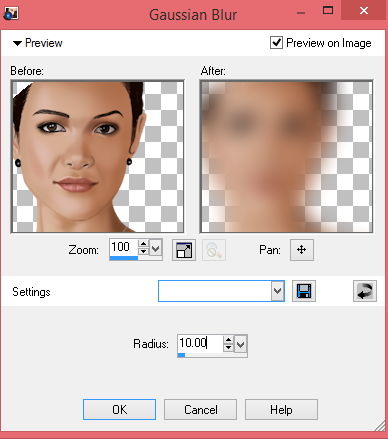
Open your half tube - copy/paste - do not resize - position to your liking - use your magic wand on your frame - expand by 8 - invert - select tube and delete - select none - duplicate - Gaussian Blur - radius 10 - layer property - Screen - Opacity around 77
Open full size tube - copy/paste - resize 60% - position to your liking - add drop shadow
Open WeddingCake - copy/paste - resize 45% - position to your liking
Open PearlFlower - copy/paste - resize 45% - position to your liking
Open PerfumeSpray - copy/paste - resize 40% - position to your liking
Open HandSoap - copy/paste - resize 35% - position to your liking - dropshadow
Open HimAndHer - copy/paste - resize 35% - position to your liking
Open Boutonniere - copy/paste - resize 35% - position to your liking
July 15, 2014
The Fantastically Free Blogtrain ~ Summer Sunset


July 10, 2014
PTU Tutorial ~ Prima Ballerina

Written: 7/10/14
I used PSP XI to write this tutorial
You must have basic knowledge of PSP
Scrap Kit: Prima by Irish Princess Designs
Tube: Dance by Roman Zaric Tubes
Font: Balzano
Plugins: None
Items used from kit:
New canvas 600*600
Open Element81 - copy/paste - resize 80% - position to your liking - open Paper10 - use your magic wand - select the inside of your frame - expand by 3 -new layer - copy/paste paper 10 into selection
Open Paper 8 - Open mask of choice - resize paper 600*600 - new mask layer - merge group - copy/paste - position to your liking
Open tube - copy/paste - resize to your liking - position to your liking
Open Element1 - copy/paste - resize 55% - rotate 20 - position to your liking
Open Element5 - copy/paste - resize 25% - position to your liking
Open Element17 - copy/paste - resize 50% - position to your liking
Open Element2 - copy/paste - resize 50% - position to your liking
Open Element32 - copy/paste - resize 30% - position to your liking
Open Element50 - copy/paste - resize 40% - position to your liking
Open Element4 - copy/paste - resize 18% - position to your liking
Add your copyright, license and name before saving
July 6, 2014
PTU Kit ~ Summer Blossom

July 1, 2014
PTU Tutorial ~ Solitaire

Written: 7/1/14
I used PSP XI to write this tutorial
You must have basic knowledge of PSP
Scrap Kit: Solitaire by Wicked Princess Scraps
Tube: Solitaire by Freya Langford-Sidebottom
Font: Summertime
Mask : MPM_Mask20
Plugins: None
Items used from kit:
New canvas 600*600
Open FRAME9 - copy/paste - resize 68% - position to your liking - open PP1 - copy/paste - resize to your desire - delete excess around frame
Open tube - copy/paste - duplicate twice - postion all to your liking -delete excess around frame
Open PP8 - resize 75% - open mask - click on your paper - layers - new mask layer - From Image - choose the name of your mask and click ok - merge group - copy/paste - position to your liking and resize to your liking
Open BUTTERFLY1 - copy/paste - resize 68% - position to your liking - dropshadow
Open SUN - copy/paste - position to your liking
Open FLOWER12 - copy/paste - resize 35% - position to your liking - duplicate - mirror - position to your liking
Open FLOWER23 - copy/paste - resize 35% - position to your liking - duplicate - mirror - position to your liking
Open SWIRL - copy/paste - resize 60% - position to your liking - duplicate - mirror - position to your liking
Open FOILAGE - copy/paste - resize 50% - position to your liking -duplicate - mirror - position to your liking
Subscribe to:
Posts
(Atom)
I CT For


CU4CU License


