


Showing posts with label Tiny Turtle Designs. Show all posts
Showing posts with label Tiny Turtle Designs. Show all posts
November 6, 2014
PTU Tutorial ~ Pink Tea

Written: 11/06/14
I used PSP XI to write this tutorial
You must have basic knowledge of PSP
Scrap Kit: Pretty Winter by Tiny Turtle Designs
Tube: Tea Pink Girl by Arthur Crowe
Font: Gigi
Plugins: None
Items used from kit:
New canvas 600*600
Open 25 - copy/paste - resize 75% - position to your liking - use your magic wand to select the inside of your frame - expand by 10 - new layer - open paper 32 - copy/paste into selection - select none
Open fullsize tube - copy/paste - resize 55% - position to your liking - drop shadow
Open 37 - copy/paste - resize 65% - position to your liking
Duplicate twice - rotate and position to your liking
Open 4 - copy/paste - resize 45% - position to your liking
Open 2 - copy/paste - resize 35% - position to your liking
Open 12 - copy/paste - resize 20% - position to your liking
Open 64 - copy/paste - resize 27% - position to your liking
Open 8 - copy/pste - resize 21% - position to your liking
Open 74 - copy/paste - resize 45% - position to your liking
Duplicate and mirror - position to your liking and rotate
Add copyright, license and name before saving
November 2, 2014
PTU Tutorial ~ I love Winter FB Timeline


Written: 11/02/14
I used PSP XI to write this tutorial
You must have basic knowledge of PSP
Scrap Kit: Frosty by Tiny Turtle Designs
Tube: Ice Queen by Arthur Crowe
Font: For Winter
Template : Facebook Timeline Template 55 by Millie's PSP Madness
Plugins: Color Dot
Items used from kit:
Open your template and close off the credits
Open paper 32 - select your layer 1 of your template - select all - select your paper - copy/paste into selection of your template - select none
Close off layers 2 and 3
Select layer 4 - use your magic wand to select it - open paper 21 - copy/paste into selection - select none

Select layer 7 - change the color to #307397 - select all - float - Color Dot - defloat - expand by 2 - new layer - flood fill with #ffffff - select none - add drop shadow

Select layer 6 - select all - float - Color Dot - defloat - select none

Open your tube of choice - copy/paste - position to your liking and duplicate 4 times - position those as you like and merge the tubes together - select layer 4 - use your magic wand to select layer 4 - Invert - select tubes layer and delete - select none - set Opacity to 73
Copy/paste fullsize tube - position to your liking - drop shadow
Open 132 - copy/paste - resize 40% - position to your liking - duplicate and mirror - position to your liking
Open 23 - copy/paste - resize 20% - position to your liking
Open 23 - copy/paste - resize 10% - position to your liking - duplicte - position to your liking
Open 2 - copy/paste - position to your liking
Open 60 - copy/paste - resize 25% - duplicate twice and position to your liking
Open 121 - copy/paste - resize 65% - position to your liking
Add copyright, license and name before saving
New canvas 180*180
Use your magic wand to select your canvas - open paper 32 - copy/paste into selection - select none
Open tube - copy/paste - resize and position to your liking - drop shadow
Open 2 - copy/paste - resize as needed - position to your liking
Add copyright, license and name/initial before saving
October 26, 2014
PTU Tutorial ~ Winter Snow

Written: 10/26/14
I used PSP XI to write this tutorial
You must have basic knowledge of PSP
Scrap Kit: Winter Snow by Tiny Turtle Designs
Tube: 3-2 by Anna Marine
Font: Young & Beautiful
Plugins: None
Items used from kit:
New canvas 600*600
Open 8 - copy/paste - resize 70% - position to your liking -use your magic wand to select the inside of your frame - expand by 43 - new layer - open paper 14 - copy/paste into selection select none
Open tube - copy/paste - position to your liking
Open 36 - copy/paste - resize 38% -position to your liking
Open 17 - copy/paste - resize 25% - position to your liking - drop shadow
Open 16 - copy/paste - resize 25% - position to your liking - drop shadow
Open 79 - copy/paste - resize 60% - position to your liking
Open 83 - copy/paste - resize 40% - position to your liking
Open 70 - copy/paste - resize 80% - position to your liking
Add copyright, license and name before saving
October 23, 2014
PTU Tutorial ~ Beyond Death

Written: 10/23/14
I used PSP XI to write this tutorial
You must have basic knowledge of PSP
Scrap Kit: Beyond Death by Tiny Turtle Designs
Tube: Jackie by Tony T
Font: PentaGram's Malefissent
Items used from kit:
New canvas 600*600
Open 15 - copy/paste - resize 60% - position to your liking - use your magic wand to select the inside of your frame - expand by 12 - new layer - open paper 27 - copy/paste into selection - select none
Open tube - copy/paste - do not resize - position under your frame - use your magic wand to select the inside of your frame - expand by 12 - invert - select your tube and delete - select none
Open tube - copy/paste - resize 32% - position to your liking - drop shadow
Open 111 - copy/paste - position to your liking
duplicate and position to your liking
Open 138 - copy/paste - resize 30% - position to your liking
Open 50 - copy/paste - resize 30% - position to your liking
Open 70 - copy/paste - resize 40% - position to your liking
Open 72 - copy/paste - resize 28% - position to your liking
Open 96 - copy/paste - resize 26% - position to your liking
October 15, 2014
PTU Tutorial ~ Vintage Days

Written: 10/15/14
I used PSP XI to write this tutorial
You must have basic knowledge of PSP
Scrap Kit: Vintage Days by Tiny Turtle Designs
Tube: 4-3 by Anna Marine
Font: Magnolia Light
Plugins: None
Items used from kit:
New canvas 600*600
Open 3 - copy/paste - resize 65% - position to your liking - use your magic wand to select the inside of your frame - expand by 12 - new layer - open paper 9 - copy/paste into selection - select none
Open tube - copy/paste - position to your liking - add drop shadow
Open Paper 14 - resize 600*600 - open mask of choice - make a new mask layer with mask of choice - merge group - copy/paste - position to your liking
Open 99 - copy/paste - resize 35% - position to your liking
Open 1 - copy/paste - resize 35% - position to your liking
Open 110 - copy/paste - resize 30% - position to your liking
Open 71 - copy/paste - resize 50% - position to your liking
Open 72 - copy/paste - resize 32% - position to your liking
Open 55 - copy/paste - resize 32% - position to your liking
Open 4 - copy/paste - resize 20% - position to your liking
Add copyright, license and name before saving
October 9, 2014
PTU Tutorial ~ Haunted


Written: 10/9/14
I used PSP XI to write this tutorial
You must have basic knowledge of PSP
Scrap Kit: Haunted by Tiny Turtle Designs
Tube: Moon by Lady Mishka
Font: Sandy Bay
Plugins: None
Items used from kit:
New canvas 600*600
Open 7 - copy/paste - resize 50% - position to your liking - use your magic wand to select the inside of your frame - expandy by 5 - new layer - open paper 33 - copy/paste into selection - select none
Open tube - copy/paste - resize as needed - position to your liking - select your frame and use your magic wand to select the inside - expand by 5 - invert - select tube and delete - select none - duplicate - select original layer - set blend mode to Hard Light - select duplicate layer - set blend mode to Luminance (L)
Open tube - copy/paste - resize and position as needed
Open 49 - copy/paste - position to your liking
Open 23 - copy/paste - resize 60% - position to your liking
Open 116 - copy/paste - resize 35% - position to your liking
Open 10 - copy/paste - resize 35% - position to your liking
Open 22 - copy/paste - resize 40% - position to your liking
Open 15 - copy/paste - resize 25% - position to your liking
Open 20 - copy/paste - do not resize - position to your liking
Add copyright, license and name before saving
September 25, 2014
PTU Tutorial ~ Stunning Autumn

Written: 9/25/14
I used PSP XI to write this tutorial
You must have basic knowledge of PSP
Scrap Kit: Stunning Autumn by Tiny Turtle Designs
Tube: 50-2 by Jamie Kidd
Font: Magnolia Light
Plugins: None
Items used from kit:
New canvas 600*600
Open 8 - copy/paste - resize 65% - position to your liking - use your magic wand to select the inside of your frame - expand by 15 - new layer - open paper 21 - copy/paste into selection - select none
Open tube - copy/paste - resize as needed - position to your liking
Open paper 3 - resize 600*600 - open mask of choice - use new mask layer to apply mask - merge group - copy/paste - position to your liking
Open 2 - copy/paste - resize 55% - position to your liking
Open 4 - copy/paste - resize 80% - position to your liking
Open 10 - copy/paste - resize 45% - position to your liking
Open 101 - copy/paste - resize 25% - position to your liking
Open 32 - copy/paste - resize 20% - position to your liking
Open 49 - copy/paste - resize 60% - position to your liking
Open 103 - copy/paste - resize 30% - position to your liking
Add copyright, license and name before saving
September 24, 2014
PTU Tutorial ~ Hot Halloween

Written: 9/24/14
I used PSP XI to write this tutorial
You must have basic knowledge of PSP
Scrap Kit: Neon Treats by Tiny Turtle Designs
Tube: Special buy by Ismael Rac
Font: Halflight
Plugins: None
Items used from kit:
New canvas 600*600
Open 79 - copy/paste - resize 66% - position to your liking - select your frame - use your magic wand to select the inside of your frame - expand by 8 - new layer - open paper 7 - copy/paste into selection - select none
Open tube - copy/paste under frame - position to your liking - select frame - use your magic wand to select the inside of your frame - expand by 8 - invert - select tube and delete - select none - set blend mode to Hard Light
Opn paper 23 - resize 600*600 - open mask of choice - use new mask layer to apply mask - merge group - copy/paste - position to your liking
Open 80 - copy/paste - resize 35% - position to your liking
Open 88 - copy/paste - resize 55% - position to your liking
Open 87 - copy/paste - resize 35% - position to your liking
Open 103 - copy/paste - resize 38% - position to your liking
Open 97 - copy/paste - resize 33% - position to your liking
Add copyright, license and name before saving
September 23, 2014
PTU Tutorial ~ Autumn Beauty

Written: 9/23/14
I used PSP XI to write this tutorial
You must have basic knowledge of PSP
Scrap Kit: Autumn Sunset by Tiny Turtle Designs
Tube: Sweet Fall by Arthur Crowe
Font: Axiom
Plugins: None
Items used from kit:
New canvas 600*600
Open 42 - copy/paste - resize 85% - position to your liking - use your magic wand to select the inside of your frame - expand by 10 - new layer - open paper 26 - copy/paste into selection - select none
Open tube - copy/paste - resize 55% - position to your liking - drop shadow
Open paper 18 - resize 600*600 - open mask of choice - apply mask - merge group - copy/paste - position to your liking
Open 100 - copy/paste - resize 85% - position to your liking
duplicate - mirror
Open 53 - copy/paste - resize 45% - flip - position to your liking
duplicate - mirror
Open 52 - copy/paste - resize 40% - position to your liking -duplicate - mirror
Open 57 - copy/paste - resize 65% - position to your liking
duplicate - mirror - position to your liking
Add copyright, license and name before saving
September 20, 2014
PTU Tutorial ~ Pumpkin Witch

Written: 9/20/14
I used PSP XI to write this tutorial
You must have basic knowledge of PSP
Scrap Kit: Witchy Nights by Tiny Turtle Designs
Tube: Pumpkin Bag by Arthur Crowe
Font: Witches Magic
Plugins: None
Items used from kit:
New canvas 600*600
Open 59 - copy/paste - resize 85% - position to your liking - use your magic wand to select the inside of your frame - expand by 5 - new layer - open paper 36 - copy/paste into selection - select none
Open close up tube - copy/paste - position to your liking - select your frame - use your magic wand to select the inside of your frame - expand by 5 - invert - select your tube - delete excess tube - select none
Open paper 35 - resize 600*600 - open mask of choice - apply mask - merge group - copy/paste - position to your liking
Open 1 - copy/paste - resize 45% - position to your liking
Open 31 - copy/paste - resize 46% - position to your liking
Open 106 - copy/paste - resize 60% - position to your liking
Open 98 - copy/paste - resize 50% - position to your liking
Open 104 - copy/paste - resize 25% - position to your liking
Open 18 - copy/paste - position to your liking
Open 12 - copy/paste - position to your liking
Open 16 - copy/paste - resize 15% - position to your liking
Add your copyright, license and name before saving
PTU Tutorial ~ Pumpkin

Written: 9/20/14
I used PSP XI to write this tutorial
You must have basic knowledge of PSP
Scrap Kit: Pumpkin Party by Tiny Turtle Designs
Tube: Pumpkin Fairy Love by Arthur Crowe
Font: Pumpkin
Plugins: None
Items used from kit:
New canvas 600*600
Open 137 - copy/paste - resize 80% - position to your liking - use your magic wand to select the inside of your frame - expand by 5 - new layer - open paper 32 - copy/paste into selection - select none
Open close up tube - copy/paste - resize and position to your liking - use your magic wand to select the inside of your frame - expand by 5 - invert - select your tube and delete - select none - duplicate - select original layer - set blend mode to Luminance (L) - select duplicate layer - set blend mode to overlay
Open full size tube - copy/paste - resize 60% - mirror - position to your liking - drop shadow
Open paper 45 - resize 600*600 - open mask of choice - apply mask - merge group - copy/paste - position to your liking
Open 32 - copy/paste - resize 32% - position to your liking
Open 29 - copy/paste - resize 32% - position to your liking
Open 49 - copy/paste - resize 32% - position to your liking - dropshadow
Open 36 - copy/paste - position to your liking
Open 92 - copy/paste - resize 28% - position to your liking
Open 84 - copy/paste - position to your liking
Open 31 - copy/paste - resize 28% - position to your liking
Add copyright, license and name before saving
September 14, 2014
PTU Tutorial ~ Spooky Niights

Written: 9/14/14
I used PSP XI to write this tutorial
You must have basic knowledge of PSP
Scrap Kit: Spooky Nights by Tiny Turtle Designs
Tube: Sweet Blood by Arthur Crowe
Font: Hellmuth
Plugins: None
Items used from kit:
New canvas 600*600
Open 66 - copy/paste - resize 70% - position to your liking - use your magic wand to select the inside of your frame - expand by 12 - new layer - open paper 50 - copy/paste into selection - select none
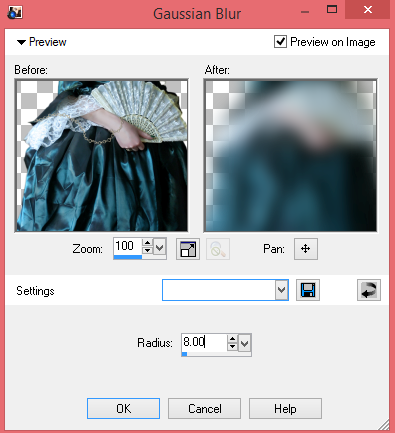
Open close up tube - copy/paste - resize and position to your liking - use your magic wand to select the inside of your frame - expand by 12 - invert - delete excess tube - select none - duplicate - gaussian blur - radius 8 - layer property : Burn - Opacity around 57

Open full size tube - copy/paste - resize as needed - position to your liking - duplicate - gaussian blur - radius 8 - layer property : Hard Light
Open paper 51 - resize 600*600 - open mask of choice - apply mask to paper - merge group - copy/paste - position to your liking
Open 72 - copy/paste - resize 40% - position to your liking
Open 98 - copy/paste - resize 36% - position to your liking
Open 101 - copy/paste - resize 45% - position to your liking
Open 107 - copy/paste - resize 45% - position to your liking
Open 8 - copy/paste - resize 35% - rotate and position to your liking
Open 4 - copy/paste - resize 65% - position to your liking
Add copyright, license and name before saving
September 7, 2014
PTU Tutorial ~ Antique Beauty

Written: 9/7/14
I used PSP XI to write this tutorial
You must have basic knowledge of PSP
Scrap Kit: Antique Autumn by Tiny Turtle Designs
Tube: The Latest in Accessories by Ida Larsen
Font: Nella Sue Demo
Plugins: None
Items used from kit:
New canvas 600*600
Open 132 - copy/paste - resize 75% - position to your liking - use your magic wand to select the inside of your frame - expand by 12 - new layer - open paper 20 - copy/paste into selection - select none
Add full size tube - position to your liking - duplicate - Gaussian Blur - Radius 8 - Layer Property : Hard Light - drop shadow
Open paper 6 - resize 600*600 - open mask of choice - apply to paper - merge group - copy/paste - position to your liking
Open 86 - copy/paste - resize 45% - position to your liking
Open 89 - copy/paste - resize 45% - position to your liking
Open 91 - copy/paste - resize 35% - position to your liking
Open 27 - copy/paste - resize 24% - position to your liking
Open 4 - copy/paste - resize 31% - position to your liking
Open 20 - copy/paste - resize 25% - position to your liking
August 29, 2014
PTU Tutorial ~ Steamed Lady

Written: 8/29/14
I used PSP XI to write this tutorial
You must have basic knowledge of PSP
Scrap Kit: Big Bad Wolf by Tiny Turtle Designs
Tube: Machine Girl BONUS by Arthur Crowe
Font: Steamwreck
Plugins: None
Items used from kit:
New canvas 600*600
Open 27 - copy/paste - resize 65% - position to your liking - use your magic wand to select the inside of all 3 frames - expand by 6 - new layer - open paper 48 - copy/paste into selection - select none
Open 28 - copy/paste - resize 55% - position to your liking - use your magic wand and select the inside of your frame - expand by 8 - new layer - open paper 46 - copy/paste into selection - select none
Open tube - copy/paste - position to your liking - use your magic wand to select the inside of your frame - expand by 8 - invert - delete excess tube - select none - duplicate - gaussian blur - radius 10 - layer property : Multiply - opacity around 67

Open tube - copy/paste - position to your liking - use your magic wand and select the inside of one of your frames - expand by 8 - invert - delete excess tube - select none - opacity 67 -repeat for your next two frames
Open paper 40 - resize 600*600 - open mask of choice - apply mask - merge group - copy/paste - position to your liking
Open 52 - copy/paste - resize 35% - position to your liking
Open 42 - copy/paste - resize 18% - position to your liking
Open 128 - copy/paste - resize 35% - position to your liking
Open 40 - copy/paste - resize 40% - position to your liking
Open 167 - copy/paste - resize 25% - position to your liking
Add copyright and license before saving
August 22, 2014
PTU Tutorial ~ Pumpkin Party


Written: 8/22/14
I used PSP XI to write this tutorial
You must have basic knowledge of PSP
Scrap Kit: Pumpkin Party by Tiny Turtle Designs
Tube: Special Buy Vampalicious by Ismael Rac
Font: I Refuse To Sink
Plugins: None
Items used from kit:
New canvas 600*600
Open 75 - copy/paste - resize 75% - position to your liking - use your magic wand and select the inside of your frame - expand by 8 - new layer - open paper 12 - copy/paste into selection - select none
Open tube - copy/paste - resize if needed - position to your liking - use your magic wand to select the inside of your frame - expand by 8 - invert - delete excess tube - select none - opacity around 69
Open tube - copy/paste - resize 45% - position to your liking - duplicate - Gaussian blur - Radius 12 - Layer Property : Color Legacy - opacity around 77

Open paper 45 - resize 600*600 - open mask of choice - apply mask - merge group -copy/paste - position to your liking
Open 18 - copy/paste - resize 75% -position to your liking
Open 60 - copy/paste - resize 50% - position to your liking
Open 58 - copy/paste - resize 48% - position to your liking
Open 84 - copy/paste - do not resize - position to your liking - opacity around 46
Open 88 - copy/paste - resize 25% - position to your liking
Open 140 - copy/paste - resize 40% - position to your liking
Open98 - copy/paste - resize 30% - position to your liking
Add copyright and license before saving
August 18, 2014
PTU Tutorial ~ Evil Alice

Written: 8/18/14
I used PSP XI to write this tutorial
You must have basic knowledge of PSP
Scrap Kit: Evil Alice by Tiny Turtle Designs
Tube: Evil Alice Bonus by Jose Cano
Font: Alice In Wonderland
Plugins: None
Items used from kit:
New canvas 600*600
Open 9 - copy/paste - resize 65% - position to your liking - use your magic wand to select the inside of your frame - expand by 19 - new layer - open paper 1 - copy/paste into selection - select none
Open your fullsize tube - copy/paste - resize 45% - position to your liking - dropshadow if desired
Open 138 - copy/paste - do not resize - position to your liking
Open paper 7 - resize 600*600 - open mask of choice - apply mask - merge group - copy/paste - position to your liking
Open 100 - copy/paste - resize 65% - position to your liking
Open 38 - copy/paste - resize 40% - position to your liking
Open 54 - copy/paste - resize 42% - position to your liking
Open 134 - copy/paste - resize 80% - position to your liking
Open 104 - copy/paste - resize 20% - position to your liking
Open 15 - copy/paste - resize 30% - position to your liking
Open 82 - copy/paste - resize 35% - position to your liking
Open 5 - copy/paste - resize 35% - position to your liking
Name: Font color #9f0b0b - Font used is Alice In Wonderland - Size 33 - expand by 2 - new layer - flood fill with color #101314 - drop shadow as desired
Add copyright and license before saving
August 9, 2014
PTU Tutorial ~ Romantic Dreams

Written: 8/9/14
I used PSP XI to write this tutorial
You must have basic knowledge of PSP
Scrap Kit: Romantic Dreams by Tiny Turtle Designs
Tube: 1-3 by Anna Marine
Font: Nella Sue Demo
Plugins: None
Items used from kit:
New canvas 600*600
Open 94 - copy/paste - resize 75% - position to your liking - use your magic wand to select the inside of your frame - expand by 7 - new layer - open paper 21 - copy/paste into selection - select none
Open full size tube - copy/paste - resize if needed - use your magic wand to select the inside of your frame - expand by 7 - invert - delete excess tube - select none
Open 9 - copy/paste - resize 85% - position to your liking
Open 47 - copy/paste - resize 50% - flip - position to your liking - duplicate - mirror
Open 43 - copy/paste - resize 30% - position to your liking
Open 100 - copy/paste - resize 55% - position to your liking
Open 78 - copy/paste - resize 85% - position to your liking
Open 12 - copy/paste - resize 30% - position to your liking - duplicate - mirror
Name : Color #d07870 - Font Nella Sue Demo - Size 20 - expand by 2 - new layer - flood fill with color #512b18 - select none
Add copyright and license before saving
August 3, 2014
PTU Tutorial ~ Mystery Goddess

Written: 8/3/14
I used PSP XI to write this tutorial
You must have basic knowledge of PSP
Scrap Kit: Mystery Garden by Tiny Turtle Designs
Tube: Earth Goddess by Arthur Crowe
Font: Monkey Snake
Plugins: None
Items used from kit:
28
51
New canvas 600*600
Open 28 - copy/paste - do not resize - position to your liking - use your magic wand and select the inside of your frame - expand by 8 - new layer - open paper 9 - copy/paste into selection - select none
Open close up tube - copy/paste - do not resize - use your magic wand to the select the inside of your frame - expand by 8 - invert - delete excess tube - select none - Opacity around 69
Open paper 13 - resize 600*600 - open mask of choice - apply mask - merge group - copy/paste - position to your liking
Open full size tube - copy/paste - resize 60% - position to your liking
Open 63 - copy/paste - do not resize - position to your liking
Open 74 - copy/paste - resize 80% - position to your liking
Open 92 - copy/paste - resize 40% - position to your liking
Open 70 - copy/paste - resize 33% - position to your liking
Open 51 - copy/paste - resize 65% - position to your liking
Add copyright, license and name before saving
July 31, 2014
PTU Tutorial ~ Fushia Fairy

Written: 7/31/14
I used PSP XI to write this tutorial
You must have basic knowledge of PSP
Scrap Kit: Fushia Garden by Tiny Turtle Designs
Tube: Blossom Fairy by Arthur Crowe
Font: Badiane
Plugins: Tramages - Glass
Items used from kit:
New canvas 600*600
Open 30 - copy/paste - resize 73% - position to your liking - use your magic wand and select the inside of your frame - expandy by 13 - new layer - open paper 1 - copy/paste into selection - select none
Open fullsize tube - copy/paste - do not resize - use magic wand to select the inside of your frame - expand by 13 - invert - delete excess tube - select none - duplicate - effects : Tramages - Glass

Open full size tube - copy/paste - resize 60% - position to your liking
Open 36 - copy/paste - duplicate twice - position all to your liking
Open 29 - copy/paste - resize 40% - position to your liking
Open 37 - copy/paste - resize 38% - position to your liking
Open 63 - copy/paste - resize 26% - position to your liking
Open 171 - copy/paste - resize 48% - position to your liking
Open 143 - copy/paste - resize 55% - position to your liking
Open 86 - copy/paste - resize 39% - position to your liking
Open 73 - copy/paste - do not resize - position to your liking
Open 85 - copy/paste - do not resize - position to your liking
Open 144 - copy/paste - resize 60% - position to your liking
Add copyright, license and name before saving
July 25, 2014
PTU Tutorial ~ Night Fall

Written: 7/25/14
I used PSP XI to write this tutorial
You must have basic knowledge of PSP
Scrap Kit: Nightfall by Tiny Turtle Designs
Tube: Gracie by Myka Jelina
Font: The Cuban Wrestler
Plugins: None
Items used from kit:
New canvas 600*600
Open 22 - copy/paste - resize 70% - position to your liking - use your magic wand to select the inside of your frame - expand by 12 - new layer - open paper 53 - copy/paste into selection - select none
Open tube - copy/paste - resize - position to your liking
Open 12 - copy/paste - resize 88% - position to your liking
Open 30 - copy/paste - resize 35% - position to your liking
Open 34 - copy/paste - resize 30% - position to your liking
Open 57 - copy/paste - resize 50% - position to your liking
Open 35 - copy/paste - resize 30% - position to your liking
Open 8 - copy/paste - resize 55% - position to your liking
Add copyright, license and name before saving
Subscribe to:
Comments
(Atom)
I CT For


CU4CU License


