


Showing posts with label Broken Sky Dezine. Show all posts
Showing posts with label Broken Sky Dezine. Show all posts
April 4, 2013
PTU Tutorial~Elegant Lady

This tutorial is my creation, any resemblance to any other is coincidence and not intentional
Written: 4/4/13
Scrap kit~It's Always Been You by Broken Sky Dezines
Artwork by Jamie Kidd
Font~ Elegant
Items usde from kit~
BSD_15
Paper BSD_3
Paper BSD_7
BSD_39
BSD_4
BSD_16
BSD_13
BSD_8
New canvas 600*600
BSD_15, Paste and Resize 75% and position to your liking
Paper BSD_3, Paste under frame and delete excess
Add tube(s)
Paper BSD_7, Resize 75% and apply mask of choice, Merge and Paste
BSD_39, Paste and Resize 33% and position to your liking
BSD_4, Paste and Resize 70% and position to your liking
BSD_16, Paste and mirror, Resize 75% and position to your liking
BSD_13, Paste and position to your liking
BSD_13, Paste and Resize 60% and position to your liking
BSD_8, Paste and Resize 40% and position to your liking
Add drop shadow to elements of desire
Add copyright and license
Add name
save as png

March 25, 2013
PTU Tutorial~Sugar Rush

This tutorial is my creation, any resemblance to any other is coincidence and not intentional
Written: 3/25/13
Scrap kit~ Sugar High by Broken Sky Dezines
Artwork by Ismael Rac
Font~ Rock Death
Items used from kit~
BSD32
Paper BSD9BSD36
BSD37
Paper BSD4
BSD4
BSD2
BSD28
New canvas 600*600
BSD32, Paste and position to your liking
Paper BSD9, Paste under your frame and delete excess
Add tube(s)
BSD36, Paste and Resize 30% and position to your liking
Duplicate and Mirror
BSD37, Paste and Resize 30% and position to your liking
Paper BSD4, Resize 600*600 and apply mask of choice, Merge and Paste
BSD4, Paste and Resize 30% and position to your liking
BSD2, Paste and Resize 20% and position to your liking
BSD28, Paste and Resize 20% and positiont to your liking
Add drop shadow to desired elements
Add copyright and license
Add name
Save as png
March 4, 2013
PTU Tutorial~My Immortal

This tutorial is my
creation, any resemblance to any other is coincidence and not intentional
Written: 3/4/13
Written: 3/4/13
Scrap kit~Blood Lust by Broken Sky Dezines
Artwork by Arthur Crowe
Font~ D
Items used from kit:
Papers:
BSD_4
BSD_2
BSD_6
BSD_7
BSD_8
BSD_4
BSD_2
BSD_6
BSD_7
BSD_8
Elements:
BSD_21
BSD_2
BSD_42
BSD_20
BSD_9
BSD_21
BSD_2
BSD_42
BSD_20
BSD_9
Open template and
close off credits
Paper BSD_4
Highlight Oval, Paste into selection
Highlight Oval, Paste into selection
Paper BSD_2
Highlight, Rectangle 1 & 2 and Paste
Highlight, Rectangle 1 & 2 and Paste
Paper BSD_6
Highlight, Square 1 & 2 and Paste
Highlight, Square 1 & 2 and Paste
Paper BSD_7
Hightlight, Circle 1 & 2 and Paste
Hightlight, Circle 1 & 2 and Paste
Paper BSD_8, Resize
75% and apply mask of choice then paste
BSD_21, Paste and
Resize 40% and rotate to your desire and position to your liking
BSD_2, Paste and Resize 40% and position to your liking
BSD_42, Paste, do not resize, position to your liking
BSD_20, Paste and Resize 30%, position to your liking
Duplicate and mirror
BSD_9, Paste and Resize 70%, position to your liking
BSD_2, Paste and Resize 40% and position to your liking
BSD_42, Paste, do not resize, position to your liking
BSD_20, Paste and Resize 30%, position to your liking
Duplicate and mirror
BSD_9, Paste and Resize 70%, position to your liking
Add drop shadow to
first two elements
Add copyright and
license
Add name
Add name
Save as png
February 12, 2013
PTU Tutorial~Pigtails

This tutorial is my
creation, any resemblance to any other is coincidence and not intentional
Written: 2/12/13
Written: 2/12/13
Scrapkit: Pigtails by Broken Sky Dezine exclusive to Ismael Rac's store
Artwork by Ismael Rac
Font~ Amazing Symphony
Items used from kit:
Elements:
BSD11
BSD3
BSD21
BSD38
BSD37
BSD24
BSD39
BSD14
BSD9
BSD11
BSD3
BSD21
BSD38
BSD37
BSD24
BSD39
BSD14
BSD9
Papers:
BSD2
BSD8
BSD2
BSD8
New canvas 600*600
BSD11, Paste and Resize 90% and position to your liking
Paper BSD2, Paste under frame and delete excess
Add tube(s)
Paper BSD8, Resize
600*600 and apply mask of choice, Merge then paste
BSD3, Paste and position to your liking
BSD21, Paste and Resize 50% and positiont to your liking
BSD38, Paste and Resize 36% and position to your liking
BSD37, Paste and Resize 25% and position to your liking
BSD24, Paste and Resize 25% and position to your liking
BSD39, Paste and Resize 23% and position to your liking
BSD14, Paste and Resize 80% and position to your liking
BSD9, Paste and Resize 35% and position to your liking
Add drop shadow to
all and tube except BSD3
Add copyright and
license
Add name
Add name
Save as png
January 15, 2013
PTU Tutorial~Sexy & Elegant

This tutorial is my
creation and any resemblance to any other is coincidence and not intentional
Written: 1/15/13
Written: 1/15/13
Scrap kit: Beau by
Broken Sky Dezines exclusive to Roman Zaric’s store
Artwork by RomanZaric
Items used from kit~
element27
paper9
paper3
element 6
element4
element2
element21
element1
element27
paper9
paper3
element 6
element4
element2
element21
element1
New canvas 600*600
element27, Paste and Resize 80%, position to your liking
paper9, Paste under frame and delete excess
element27, Paste and Resize 80%, position to your liking
paper9, Paste under frame and delete excess
Add tube(s)
Paper3, Resize
600*600 and apply mask of choice then paste
Element6, Paste and
Resize 30%, position to your liking
element4, Paste and Resize 30%, position to your liking
element2, Paste and position to your liking
element21, Paste and Resize 40%, position to your liking
element1, Paste and Resize 90%, position to your liking
element4, Paste and Resize 30%, position to your liking
element2, Paste and position to your liking
element21, Paste and Resize 40%, position to your liking
element1, Paste and Resize 90%, position to your liking
Add drop shadow to
all and tube
Add copyright and
license
Add name
Add name
Save as png
January 9, 2013
PTU Tutorial~Wicked Valentine


This tutorial is my
creation, any resemblance to any other is coincidence and not intentional
Written: 1/9/13
Written: 1/9/13
Scrap Kit~ Wicked
Valentine by Broken Sky Dezines
Artwork by Arthur Crowe
Font~ Base: Halloween
Items used from kit:
Paper BSD8
BSD39
BSD26
BSD1
BSD6
Paper BSD8
BSD39
BSD26
BSD1
BSD6
New canvas 600*250
BSD8, Make this your pattern and flood fill your canvas
BSD8, Make this your pattern and flood fill your canvas
New raster layer,
select all, modify>borders

Flood fill with white
and add noise
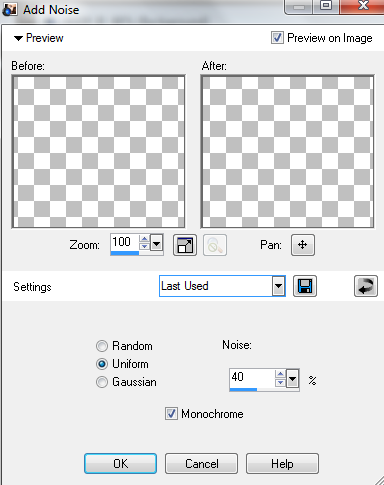
Add Tube(s)
BSD39, Paste and
Resize 20% and position to your liking
BSD26, Paste and Resize 20% and position to your liking
BSD1, Paste and Resize 50% and position to your liking
BSD6, Paste and Resize 40% and position to your liking
BSD26, Paste and Resize 20% and position to your liking
BSD1, Paste and Resize 50% and position to your liking
BSD6, Paste and Resize 40% and position to your liking
Add drop shadow to
all and the tube
Add copyright and
license
Add name/wordart
Add name/wordart
Save as png
Now for the avatar:
New canvas 200*200
Flood fill with previous pattern
Flood fill with previous pattern
Repeat border from previous instructions
Add noise as before
Add tube
Add copyright and
license
Add name/initial
Add name/initial
Save as png
December 2, 2012
PTU Tutorial~Winter Beauty

This tutorial is 100%
my creation, any resemblance to any other is coincidence and not intentional
Written: 12/2/12
Written: 12/2/12
Scrap kit~ Sweet Christmas by Broken Sky Dezines
Artwork by Zindy
Font: Snowflakes
Items used from the
kit:
BSD38
Paper BSD6
Paper BSD5
BSD44
BSD31
BSD1
BSD2
BSD19
BSD38
Paper BSD6
Paper BSD5
BSD44
BSD31
BSD1
BSD2
BSD19
Open a new canvas
600*600
BSD38>Paste>Do
not resize
Paper BSD6>Paste>Place under frame, delete excess around edges
Paper BSD6>Paste>Place under frame, delete excess around edges
Add tube(s)
Paper BSD5>Resize
600*600>Apply mask of choice
Merge group>Paste
Merge group>Paste
BSD44>Paste>Resize
55%>Position to your liking
BSD31>Paste>Resize 30%>Rotate to your desire>Position to your liking
BSD1>Paste>Resize 30%>Position to your liking
BSD2>Paste>Resize 40%>Position to your liking
BSD19>Paste>Resize 40%>Position to your liking
BSD31>Paste>Resize 30%>Rotate to your desire>Position to your liking
BSD1>Paste>Resize 30%>Position to your liking
BSD2>Paste>Resize 40%>Position to your liking
BSD19>Paste>Resize 40%>Position to your liking
Add drop shadow:
Tube(s)
BSD44
BSD31
BSD1
BSD2
BSD19
Tube(s)
BSD44
BSD31
BSD1
BSD2
BSD19
Add copyright and
license
Add name/wordart
Add name/wordart
Save as png
November 19, 2012
PTU Tutorial~Ice

This tutorial is 100%
my creation any resemblance to any other is coincidence and not intentional
Written: 11/19/12
Written: 11/19/12
You must have basic
knowledge of PSP
Scrap Kit~Ice by
Broken Sky Dezines
Artwork by Ismael Rac
Font: ice sticks
Items used from kit:
element28
paper5
paper10
element1
element25
element28
paper5
paper10
element1
element25
Open new canvas
600*600
Element28>Paste>Resize
80%>Position to your liking
Paper5>Paste>Place
under frame>Delete excess around frame
Add tube>Duplicate
Adjust>Blur>Gaussian blur
Adjust>Blur>Gaussian blur

Layer Properties>Soft
Light
Paper10>Resize
600*600>Apply mask of choice
Merge group>Paste
Merge group>Paste
Element1>Paste>Resize
50%
Image>Mirror>Position to your liking
Image>Mirror>Position to your liking
Element25>Paste>Resize
25%>Rotate to your desire>Position to your liking
element8>Paste>Resize 50%>Position to your liking
element7>Paste>Do not resize>Position to your liking
element23>Paste>Resize 35%>Position to your liking
element21>Paste>Resize 45%>Postion to your liking
element8>Paste>Resize 50%>Position to your liking
element7>Paste>Do not resize>Position to your liking
element23>Paste>Resize 35%>Position to your liking
element21>Paste>Resize 45%>Postion to your liking
Add drop shadow to:
Tube
element8
element21
element23
element7
element25
element1
Tube
element8
element21
element23
element7
element25
element1
Add copyright and
License
Add name/wordart
Save as png
October 22, 2012
PTU Tutorial~Emo Mix

This tutorial is 100% my creation any resemblance to any other is coincidence and not intentional
Written: 10/22/12
You must have basic knowledge of PSP
Scrap kit~Emo Palooza by Broken Sky Dezines
Artwork by Verymany
Font: Table Air Lamp
Let's get started!
Open a new canvas
600*600
Open BSD29
Copy & Paste as new layer
Image>Resize 75%
Position to your liking
Copy & Paste as new layer
Image>Resize 75%
Position to your liking
Open BSD11 Paper
Copy & Paste as new layer
Image>Resize (as needed)
Place under your frame
Delete excess around frame edges
Copy & Paste as new layer
Image>Resize (as needed)
Place under your frame
Delete excess around frame edges
Add tube of choice
Apply drop shadow of choice
Apply drop shadow of choice
Open BSD12 Paper
Image>Canvas Size 600*600
Apply mask of choice
Layers>Merge>Merge group
Copy & Paste as new layer
Make this your bottom layer
Image>Canvas Size 600*600
Apply mask of choice
Layers>Merge>Merge group
Copy & Paste as new layer
Make this your bottom layer
Open BSD20
Copy & Paste as new layer
Image>Resize 40%
Place above your mask layer
Move to the right of your frame
Apply drop shadow of choice
Copy & Paste as new layer
Image>Resize 40%
Place above your mask layer
Move to the right of your frame
Apply drop shadow of choice
Open BSD27
Copy & Paste as new layer
Image>Resize 70%
Move to the bottom of your frame
Apply drop shadow of choice
Open BSD26
Copy & Paste as new layer
Image>Resize 85%
Move to the bottom of your frame
Image>Free Rotate
Use these settings:
Copy & Paste as new layer
Image>Resize 70%
Move to the bottom of your frame
Apply drop shadow of choice
Open BSD26
Copy & Paste as new layer
Image>Resize 85%
Move to the bottom of your frame
Image>Free Rotate
Use these settings:

Apply drop shadow of
choice
Open BSD38
Copy & Paste as new layer
Place under your mask layer
Copy & Paste as new layer
Place under your mask layer
Open BSD59
Copy & Paste as new layer
Image>Resize 30%
Move to the right of your frame
Copy & Paste as new layer
Image>Resize 30%
Move to the right of your frame
Open BSD1
Copy & Paste as new layer
Image>Resize 45%
Move to the bottom right of your frame
Apply drop shadow of choice
Copy & Paste as new layer
Image>Resize 45%
Move to the bottom right of your frame
Apply drop shadow of choice
Open BSD6
Copy & Paste as new layer
Image>Resize 30%
Place under your BSD1 layer
Apply drop shadow of choice
Copy & Paste as new layer
Image>Resize 30%
Place under your BSD1 layer
Apply drop shadow of choice
Add copyright
Add name text/wordart
Save as png
Subscribe to:
Posts
(Atom)
I CT For


CU4CU License


